How do I resolve the "ReceiveResponseXML failed" error?
Last updated: July 23, 2025
End users may encounter the following error in the Quickbooks Web Connector (QWC):Last result: ReceiveResponseXML failed
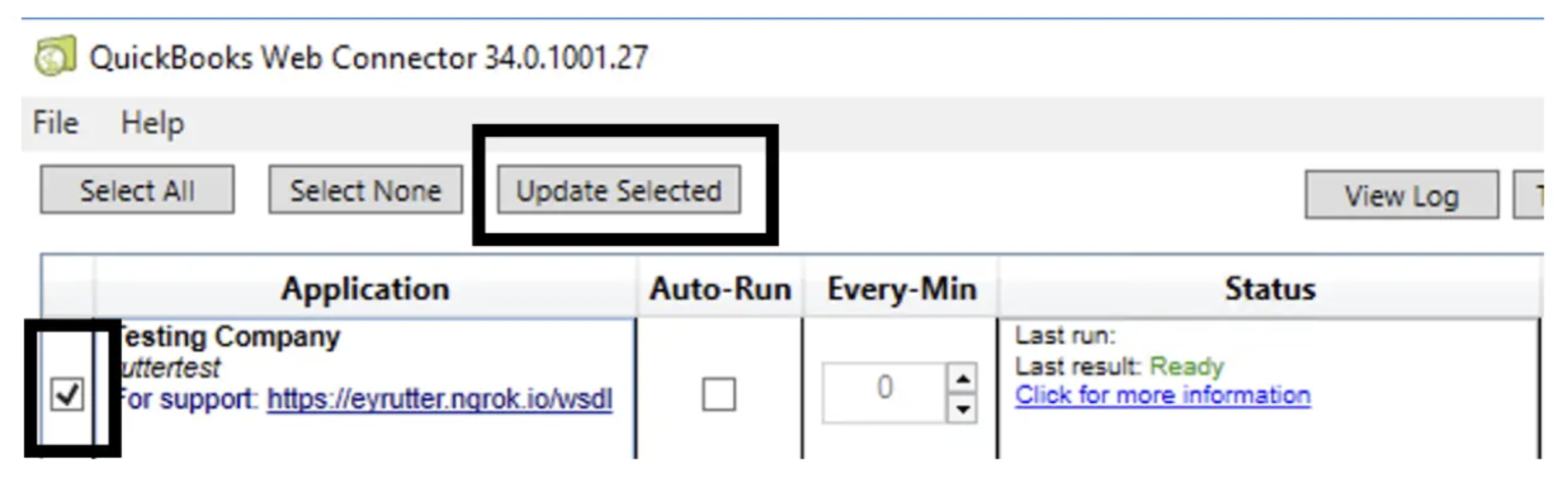
This is a known, generic, transient error produced by the QWC when one of Rutter's requests to Quickbooks Desktop fails. This should not interfere with sync progress. To fix the issue, the end user will need to re-run Update Selected .
How do I fix this error?
The end user will need to complete the following:
Re-open QWC
Click the checkbox associated with the Rutter connection.
Click
Update Selectedto start the sync process again.
Additional considerations
The display on QWC can make it hard to interpret whether meaningful progress is happening during a sync. Cross-referencing their sync activity with any activity under Sync History in Rutter's dashboard can help verify work is being done and instill more confidence in the connection.