How does class tracking at the transaction or line item level in QuickBooks Online affect class_id behavior?
Last updated: September 23, 2025
QuickBooks Online's "Track classes" setting controls whether class_id applies at the transaction level or line item level. This setting impacts how data flows through Rutter’s Accounting API for invoices and bills.
Checking Track Classes Settings in QuickBooks
You can view your Track Classes setup in QuickBooks:
Account and Settings → Advanced → Categories (Track classes)
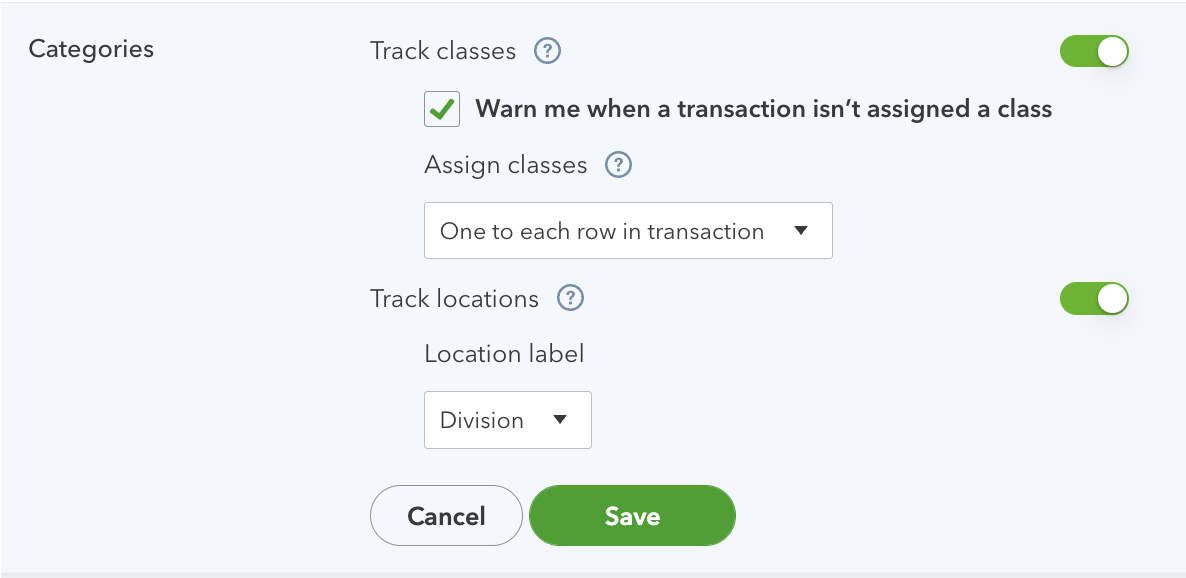
Or retrieve it programmatically:
GET /accounting/company_info?expand=platform_data
Look for:
platform_data.Preferences.AccountingInfoPrefs.ClassTrackingPerTxnplatform_data.Preferences.AccountingInfoPrefs.ClassTrackingPerTxnLine
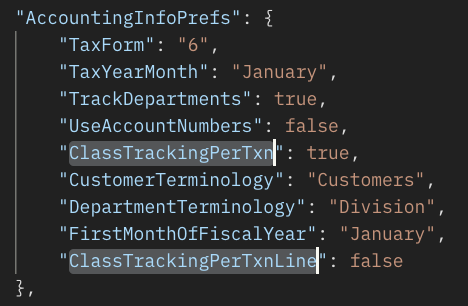
Class_ID Behavior:
Invoices
One to each row in transaction (per line item):
Only
class_idon line_items is used.Top-level
class_idis ignored without error.
One to entire transaction:
Only the top-level
class_idis used.Line item
class_ids are ignored.
Bills
class_idalways applies at the line_items level, regardless of configuration.